 Web Design
Why your website's contact form must be tested and reach your inbox
A contact form is only working if the message lands in the owner's inbox. The thank-you screen a visitor sees proves nothing, because that screen looks identical whether the email arrived, went to spam, or vanished. I have repaired this problem on client sites, and the fix is usually simple. The danger is that nobody knows it is broken.
Does my website contact form actually reach my inbox?
Not necessarily, and you cannot tell by looking at the site. A form can show "message sent" while the email is blocked, filtered, or sent to an address nobody checks. The only proof is a real submission that you receive. If you have never submitted your own form and watched your inbox, you do not yet know whether your website is capturing leads.
Why do contact form emails go to spam or never arrive?
The usual causes are ordinary. The form sends mail from your web host, and mail providers distrust it. The destination address is mistyped or out of date. A plugin or theme update changed how the form sends. A spam filter quietly catches the message. Each of these fails silently, which is why a form that worked last year can stop working without any warning.
One example from my own work: a painter I had worked with for over two years asked why he was not getting his emails. His site ran on WordPress, and the form was reporting success while the messages were not arriving. We fixed it by installing an SMTP plugin, which sends the form's mail through a proper mail account instead of the host's default. Nothing on the page had ever shown him there was a problem.
How do I test my contact form?
Run this check from your phone, because that is where most of your visitors will use it.
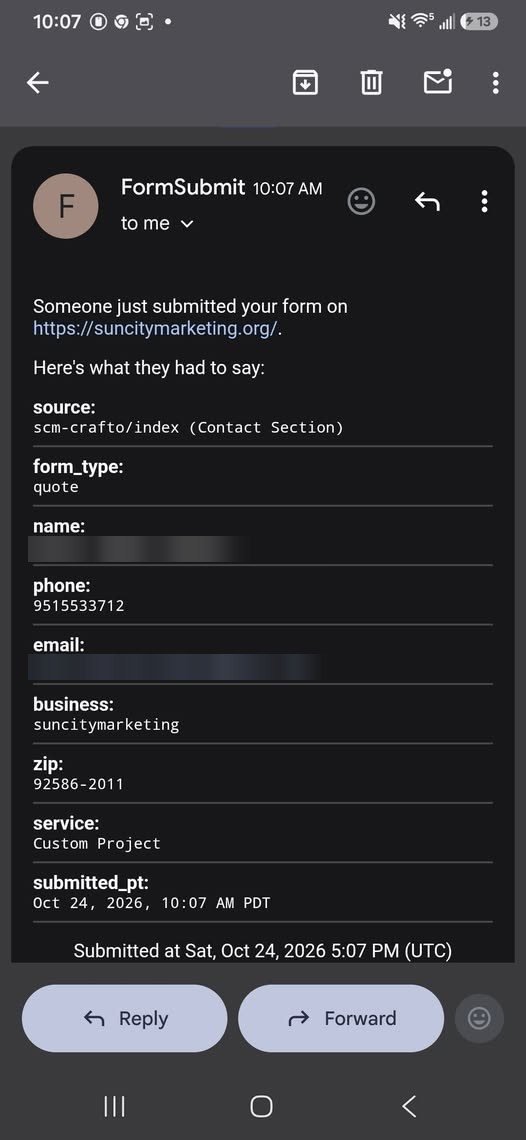
1. Open your website on your phone and go to the contact form. 2. Fill it out with a name you will recognize and your own email address. 3. Submit it, and note exactly what the visitor sees. 4. Check your inbox, then your spam folder. 5. Wait five minutes and check both again.
If the message has not arrived, the form needs attention. Run the same test again after any change to your site, theme, host, or email address. Our website audit is a useful companion check for the rest of your site.
What does a failed contact form cost a contractor?
It costs you the lead without telling you. A homeowner who needs a repair fills out the form, sees a confirmation, and waits. When no one replies, they call the next contractor on the list. You never learn that the inquiry existed, so you cannot even count the loss. For a service business, where one job can pay for months of marketing, an unreliable form is among the most expensive problems a website can have.
| What the visitor sees | What actually happened | What you know |
|---|---|---|
| Thank-you message | Email delivered to your inbox | You can reply today |
| Thank-you message | Email delivered to spam | Nothing, unless you check |
| Thank-you message | Email never sent | Nothing |
How does Sun City Marketing test a form before a site goes live?
Every new build has its form tested end to end before we deploy the site. We submit the form, and the message has to land in the owner's inbox. If the submission does not arrive correctly, the job is not a success by my standards, and the site does not go live until it does. That test happens on our staging copy first, and again when the real domain is connected.
Want to see a form that has been tested end to end?
We build a live demo in 3 business days, and you pay nothing unless you decide to move forward. The pricing page lists what each build includes.
Get a demoMy first client, a patio cover contractor, came from a flyer ad in Canyon Lake, so I have always known that a single inquiry matters to a small business.
Sun City Marketing builds custom HTML websites for contractors and service businesses. See our work at suncitymarketing.org.
How can I tell if my contact form is working?
Submit it yourself from your phone with a name you will recognize, then check your inbox and your spam folder. If nothing arrives within five minutes, the form needs repair.
Why does my form show a success message when the email never arrives?
The success message only means the form accepted the data. It does not confirm the email was delivered, so a blocked or misdirected message looks the same to the visitor.
How often should I test my contact form?
After any change to your website, theme, host, or email address, and at least a few times a year.
Does Sun City Marketing test forms before launch?
Yes. Every new build has its form tested before we deploy, and a submission that does not land in the inbox means the build is not finished.